 Sunplug
Sign in
Sunplug
Sign in
Charge your cars on surplus solar, or on the cheapest hours
Smart solar
charging
Sunplug watches what your panels are producing and what your house is using, then charges your cars with whatever is left over — following the sun through cloud and shade, minute by minute, so you buy less electricity and export less of your own. No sun, or no panels at all? Sunplug reads your tariff, market prices included, and charges whenever power is cheapest — a windy afternoon as readily as a quiet night.


Free while in beta.

Dynamic pricing
The cheapest hours, found for you.
Off-peak hours, or a market tariff priced by the hour or the quarter-hour: say what you pay and when, and Sunplug knows what each hour costs. While the car is plugged in, Sunplug fills it to its grid level during the cheapest hours, whenever they fall, at full rate, in blocks of at least an hour. Name a price you would rather not buy above and it waits for a cheaper hour instead.
If you have solar panels, Sunplug also reads the solar forecast and your own history: when enough sun is coming to reach the grid level, it waits for the sun instead of buying. The sun takes the car further from there, as far as your solar target.
Market prices: ENTSO-E Transparency Platform and ESIOS (Red Eléctrica). Solar forecast: Open-Meteo.

How it works
Connect your solar, or just your tariff
Sign in with your inverter's maker, or run a small agent on your own network for readings every thirty seconds instead of every five minutes. If your brand is not listed, send the numbers yourself — there is a documented API, and it takes ChargeHQ's own meter fields, so an existing bridge changes its address rather than its arithmetic. No panels? Skip this step — a tariff alone is enough to start.
Connect your cars
Tesla and Volvo sign in with their own accounts, handled in the app — a Tesla is driven directly, a Volvo reports its battery while your charger sets the current. Everything else goes through the wallbox over OCPP, which nearly every serious charger speaks — so the make of your car stops mattering.
Set what you want
A level for the grid to reach in the cheapest hours, a target for the sun to chase, and how much home battery to keep back. Then leave it alone. Boost when you are in a hurry; set a departure time when you are not. (Some features are only available with Tesla currently).
Tesla owners
Your Tesla needs nothing but the app.
Sunplug talks to your car directly, so there is no wallbox to configure and nothing to install in the garage. It sets the charging current amp by amp as the sun changes, and because it can see the battery it knows when to stop.
It knows the state of charge
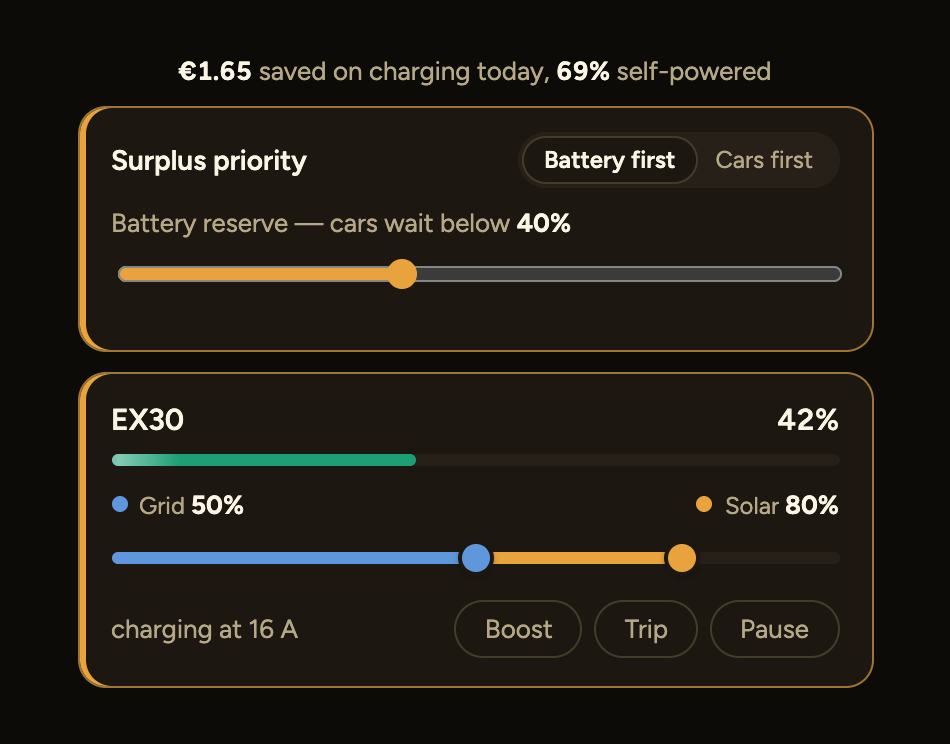
Charge to 80% on sun and no further, but keep a floor of 45% for the morning. Sunplug tops up overnight only if the sun did not get there.
Three cars, one supply
Up to three cars share whatever surplus there is, inside the limit your wiring allows. Name the one that goes first, or let Sunplug work out which needs it most.
Leaving at seven?
Set a departure time and a target. Sunplug works backwards and starts only as late as it needs to, using sun first and cheap hours after.
It stays in charge
Change the rate in the Tesla app and Sunplug notices, backs off, and tells you — rather than silently fighting you over the same setting.

A slider for every car Sunplug can see inside: blue is the level the grid guarantees in the cheapest hours, amber how much further the sun may take it.
Nearly every model, including most of the ones other tools dropped. Model 3, Model Y, and both Model S and Model X — pre-refresh cars included. Those older S and X use Tesla's legacy command path rather than the signed commands newer cars need, and Sunplug speaks both. Mine is a 2020 X, which is rather how I noticed. The one exception: pre-2018 S and X don't support Tesla's Fleet Telemetry, so those specific cars aren't covered yet.
Every other car
Any car, through a smart charger.
Any car on one of the smart chargers below charges on surplus exactly like a Tesla: Sunplug starts, stops and sets the current at the socket. The socket meters what went in and how much came off your own roof; what it cannot see is how full the battery is.
Connect the car's own maker and that missing number arrives — the battery percentage, and with it the full experience: the overnight and solar target sliders, ready-by times, live state in the app. The maker never sets the current; your charger does. A car on a plain socket cannot be managed by anyone, and Sunplug says so rather than letting you find out.
Sun when there is sun. The cheapest hours when there is not.
A cloud passes and the surplus drops. Sunplug eases the charge rate down rather than stopping, waits to see whether the sun comes back, and only gives up when it is clear it has gone. When it returns, it ramps back up.
That waiting is deliberate. Every stop and start cycles a mechanical contactor inside your charger, and those have a finite life. Chasing every dip would cost you a wallbox to save a few pennies of electricity.
Some days the sun simply does not show, and you still need the car. Sunplug fills the gap from the grid — in charge windows you set yourself, or in the cheapest hours your tariff offers, wherever in the day they fall — and above a price you name it does not buy at all.

You can see exactly what it did.
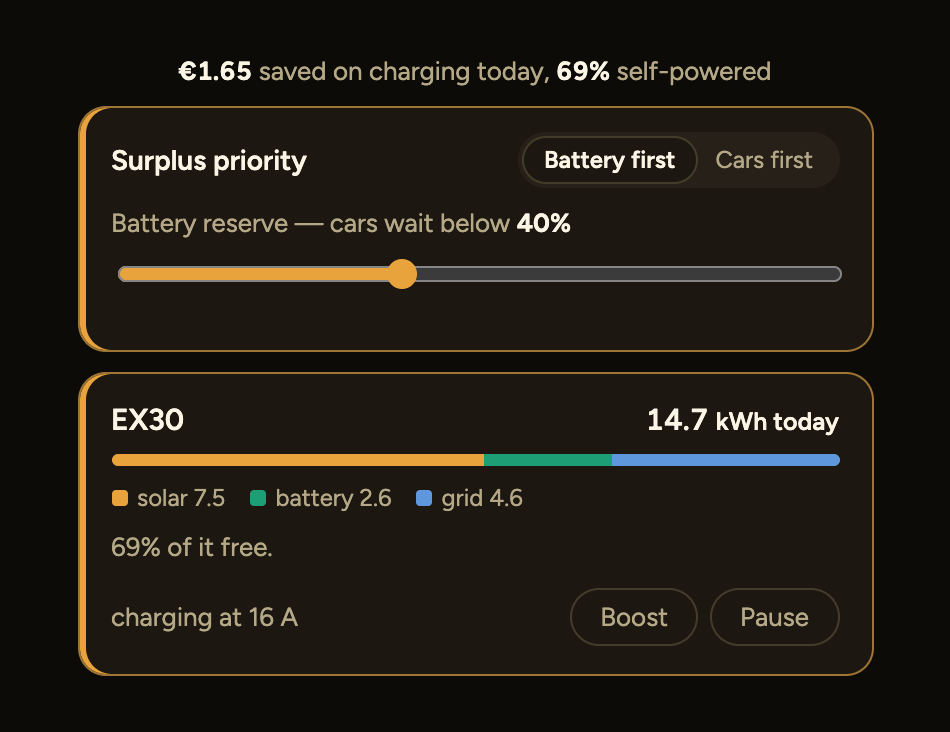
Every decision the engine makes is recorded with the reason for it. How much of your charging came from the sun rather than the grid, what it saved against charging off-peak instead, and where the energy actually went — day, month or year.
The savings figure is deliberately conservative: it compares against what you would have paid charging overnight at your off-peak rate, not against peak. Less impressive, more honest.

Sunplug Agent
Your solar, read every 30 seconds.
A Raspberry Pi on your network, set up from your phone. Nothing exposed.
Does it work with your kit?
Solar
Reading production, house use and battery.
- Enphase — locally with the agent, every thirty seconds
- Fronius — locally in seconds, over the inverter's own API
- SolarEdge — locally over Modbus with the agent, battery included
- Sungrow — locally over Modbus with the agent, or one-click cloud
- SolaX — locally with the agent, or minute-fresh cloud
- GoodWe — locally with the agent, or five-minute cloud
- LuxPower — read through its own Wi-Fi dongle with the agent, battery included
- Solis — one-click sign-in on SolisCloud's own page
- APsystems — ECU read locally; ECU-C sees the house itself, others need a meter
- SMA — read locally with the agent; pair a Shelly to see the house
- KOSTAL — read locally with the agent, with its own meter for the house
- Hoymiles — DTU-Pro or OpenDTU with the agent; pair a meter to see the house
- Victron — GX device read locally with the agent, whole site included
- Tesla Powerwall — through the Tesla connection your cars already use
- Shelly meters — pairs with any inverter that cannot see the house
- Push API — send your own readings, from a script or Node-RED
Cars & chargers
Setting the rate, not just switching on and off.
- Tesla — directly, every model except pre-2018 S and X
- Volvo — battery and plug state from the car, current set at the charger
- Volvo Wallbox — same sign-in as the car
- Ford — battery and plug state from the car, current set at the charger
- go-e — through go-e's Cloud API, a key from the go-e app
- Easee — through Easee's cloud, and their app keeps working
- Wallbox, Zaptec, ABB, Alfen, Keba, Vestel — over OCPP
- Any OCPP 1.6 wallbox — and so any car
- BMW & Mini, Hyundai / Kia / Genesis, Mercedes, VW Group — car APIs on the roadmap
Controlling the charger rather than the car is why the make of your car does not matter. The limit is applied at the socket.
The car APIs above add the one thing the socket cannot see — the battery percentage. A smart charger still sets the amps; with both together, those brands get the full experience Tesla gets today: charge to a target, ready-by times, live state in the app.
On the roadmap for solar: Huawei — read on your own network rather than through a cloud, the same way SMA and KOSTAL are today.
Setup guides for each of these — what you need, how long it takes, and what usually goes wrong. Not sure? Ask me and I will tell you honestly whether yours works today.